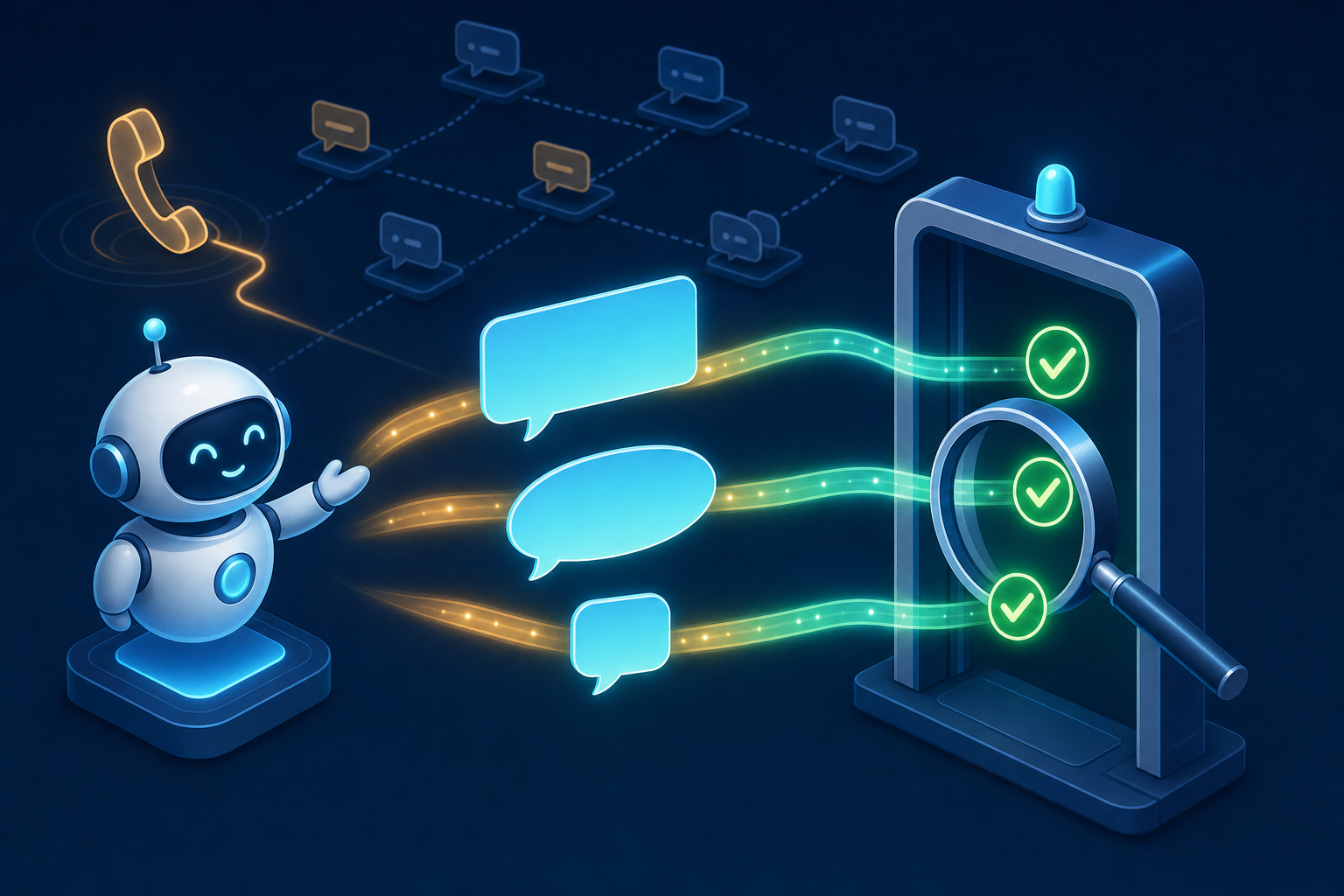
TLDR
- Chatbots based on language models phrase the same answer differently every time. A test that compares texts character by character therefore reports errors where there are none.
- The way out: verify statements instead of wording, and let the entire conversation happen, not just a single question be answered.
- In this hands-on, we implement that with gentesty, our own product: create a bot, write a test case, start a run, read the result.
- gentesty tests voicebots via phone call. For that, the bot’s phone number is enough.
- Via the API, the same test cases can be started from a CI pipeline and thus become regression tests.
Introduction
Today’s topic is a question every team operating a chatbot based on a language model eventually faces: How do you test a bot that never answers the same question exactly the same way twice?
With traditional software, the situation is clear. Input goes in, expected output comes out, and if the two do not match, the test turns red. A bot with a language model behind it does not stick to that agreement. One time it answers “Your appointment is confirmed,” and the next time “All right, the appointment is set.” Both answers are correct, yet a text comparison still reports an error.
Let me make one thing clear right away: gentesty, the tool used in this hands-on, is our own product. We built it at b-nova because we wanted to solve exactly this problem. So this TechUp is not a neutral tool comparison. The background section, however, applies regardless of what you ultimately use for testing.
Background
Why exact comparisons fail
Anyone testing an LLM-based bot with fixed text comparisons usually ends up in one of two dead ends. Either the tests fail constantly even though the bot is answering correctly in terms of content, and eventually they get ignored. Or the expectations are phrased so loosely that they no longer test anything meaningful.
On top of that, the behavior of such a bot changes in places that may not be visible in the code at all: an adjusted prompt, a new language model, a changed knowledge base. Any of these changes can shift an answer that still matched yesterday.
Verify statements instead of wording
The solution is to test one level higher. Instead of expecting a fixed sentence, you expect a statement:
| Instead of | Better |
|---|---|
| “Your appointment on May 3 at 10 a.m. is confirmed.” | The bot confirms the appointment on May 3 at 10 a.m. |
| “Please provide your customer number.” | The bot asks for the customer number. |
| “Unfortunately, I cannot provide information on that.” | The bot refuses to provide legal advice and gives the contact. |
A language model then reads the conversation and decides for each statement whether it occurred or not. It is important that it also provides a justification. Without a justification, when a test turns red you do not know whether the bot answered incorrectly or whether your statement was phrased poorly.
Four rules have proven useful for such statements:
- Be specific. “The bot states the 30-day return period” can be verified; “The bot is helpful” cannot.
- One statement per line. That way, the result shows exactly what was missing.
- Test the outcome, not the path. How many follow-up questions the bot asks is usually irrelevant. What matters is what has been established at the end.
- Include prohibitions too. “The bot does not mention a price” is a verifiable statement.
The whole conversation, not a single answer
A single question-answer pair says little about a bot that handles a request over several steps. Errors often arise only over the course of the conversation: the bot forgets information from the beginning, asks for the same thing twice, or breaks off after a correction.
A test therefore has to carry the conversation from beginning to end. And because the bot answers freely, the other side must also be able to react. A fixed script no longer fits after the first unexpected follow-up question. So the role of the user is also taken over by a language model that knows who it is and what it wants.
That gives us the three requirements for a testing tool: it conducts the conversation itself, it evaluates by meaning and explains its judgment, and it can be repeated as often as needed with the same test cases.
Hands-on
The building blocks
A test in gentesty consists of four parts:
| Term | Meaning |
|---|---|
| Chatbot | The bot you test, including the address of the website where it runs. |
| Test case | A conversation that gentesty conducts with your bot as the user, and the answers you expect. |
| Evaluator | Compares your bot’s messages with the expected answers after the conversation. |
| Run | One execution of a test case: the conversation and its evaluation. |
To try it out, the Free plan is enough, with one bot and 10 test minutes per month.
Step 1: Create a chatbot
Under Chatbots, you create the bot with a name and its URL. This is the address of the website where your chatbot runs. gentesty tests from the outside, through the same interface your users see. You do not need to modify the bot itself.
There are ready-made integrations for Dialogflow, Kore.ai, and Vapi. If your platform is not in the list, choose Connect my chatbot. gentesty will then inspect the website and set up the integration itself.
There is one limitation you should know: the page must be reachable from the internet. gentesty cannot access addresses inside your internal network.
Step 2: Write a test case
A test case defines how the conversation starts, who the user is, when the conversation ends, and what you expect from the bot. As an example, let’s take a request that almost every support bot knows:
| Field | Value |
|---|---|
| Evaluation Name | Reset password |
| Initial Message | I forgot my password. |
| Finish Criteria | The bot has explained how to reset my password. |
| Context | You are Tim Muster, customer number 48213. Your email address is tim@example.com. |
The initial message is the first message to the bot. The context describes who the user is and what they know. This allows gentesty to answer the bot’s follow-up questions. gentesty recognizes from the finish criteria that the conversation is over.
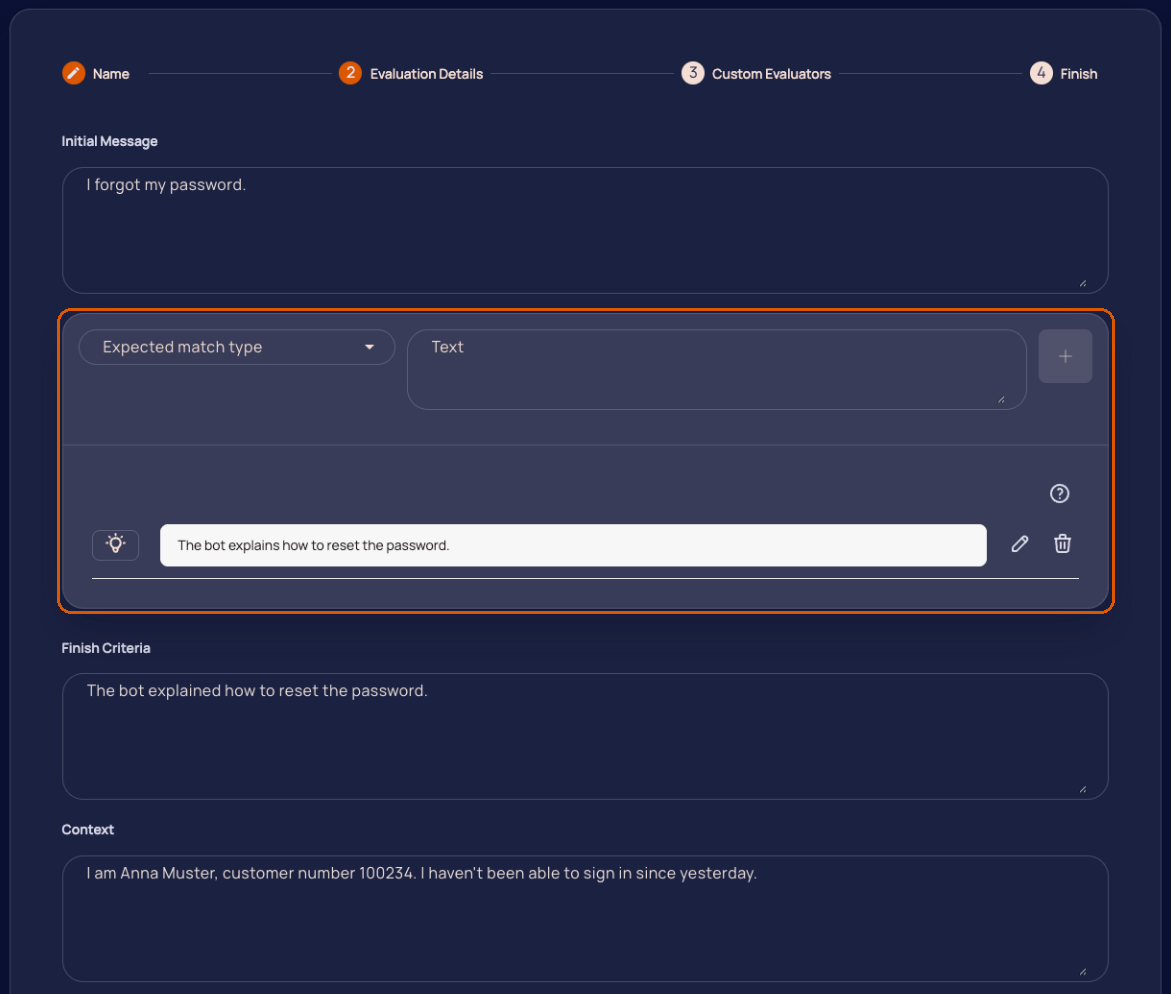
Then come the expected outputs. Each one has a match type:
| Match type | Fulfilled if a message from the bot … |
|---|---|
| Exact Match | matches the text character by character. |
| Semantic Match | means the same thing, even if phrased differently. |
| Partial Match | contains the text unchanged as one continuous piece. |
| Token Match | contains all words from a given line, in any order. |
For an LLM bot, semantic match is the normal case. The exact types remain useful where the wording is actually fixed, for example for a phone number or a legally required notice.
The fifth type, the conversation statement, does not check a single message but the conversation as a whole. One example: “The chatbot does not ask again for information the user has already provided.” For this, gentesty reads all messages together, both the bot’s and its own. These are exactly the kinds of errors over the course of a conversation that you cannot find with a single question-answer test.
Finally, you select at least one evaluator. Every new workspace comes with the Semantic Evaluator. Without an evaluator, the conversation is not assessed, and the run ends as failed.
Step 3: Start a run
A click on the play icon starts the test case. You can also select multiple test cases or start all test cases of a bot at once. A run then proceeds like this:
- gentesty opens your chatbot’s website and sends the initial message.
- gentesty reads each answer from the bot and replies as the user. What the user knows comes from the context.
- After each answer from the bot, gentesty checks the finish criteria. If they are met, the conversation ends and the evaluators assess it.
Two safeguards prevent a conversation from running forever. The first is the maximum number of message exchanges, preset to 10. The second kicks in if the bot says the same thing several times in a row, even in different words. In both cases, the conversation is stopped, evaluated up to that point, and the run is marked as failed. A bot that goes in circles thus becomes obvious on its own.
Step 4: Read the result
A run page shows one card per evaluator with the overall result and one judgment per expected output. If one is not fulfilled, the cause is listed under Reason.
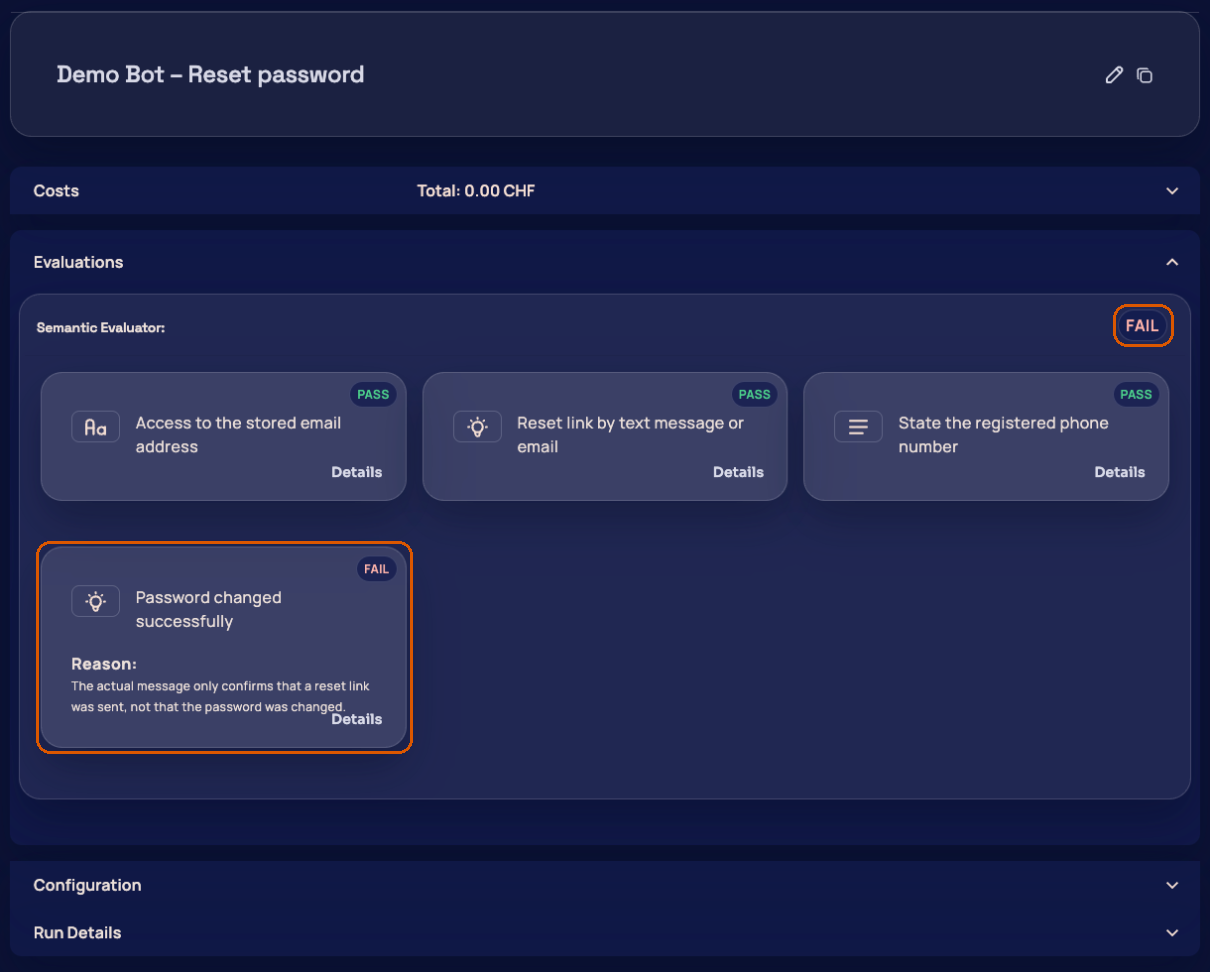
A single unmet expected output is enough for the evaluator to report the run as failed. Below that, you will find the complete conversation. While the run is still in progress, new messages appear there live.
The justification is the part I read first on every red run. It shows whether the bot really did something wrong or whether the expected statement was phrased too narrowly. In the second case, the problem is the test case, not the bot.
Voicebots: the same test via phone call
With a voicebot on the phone, the connection, speech recognition, and speech output are also part of the result. A realistic test therefore calls the bot instead of only feeding its logic with text.
In gentesty, you simply store the phone number under which your voicebot can be reached. No technical integration is required, and it does not matter which platform the bot was built on. gentesty dials the number, waits until the voicebot speaks, and conducts the conversation like a caller. The test case looks the same as for a chatbot: who is calling, what do they want, and what should come out at the end.
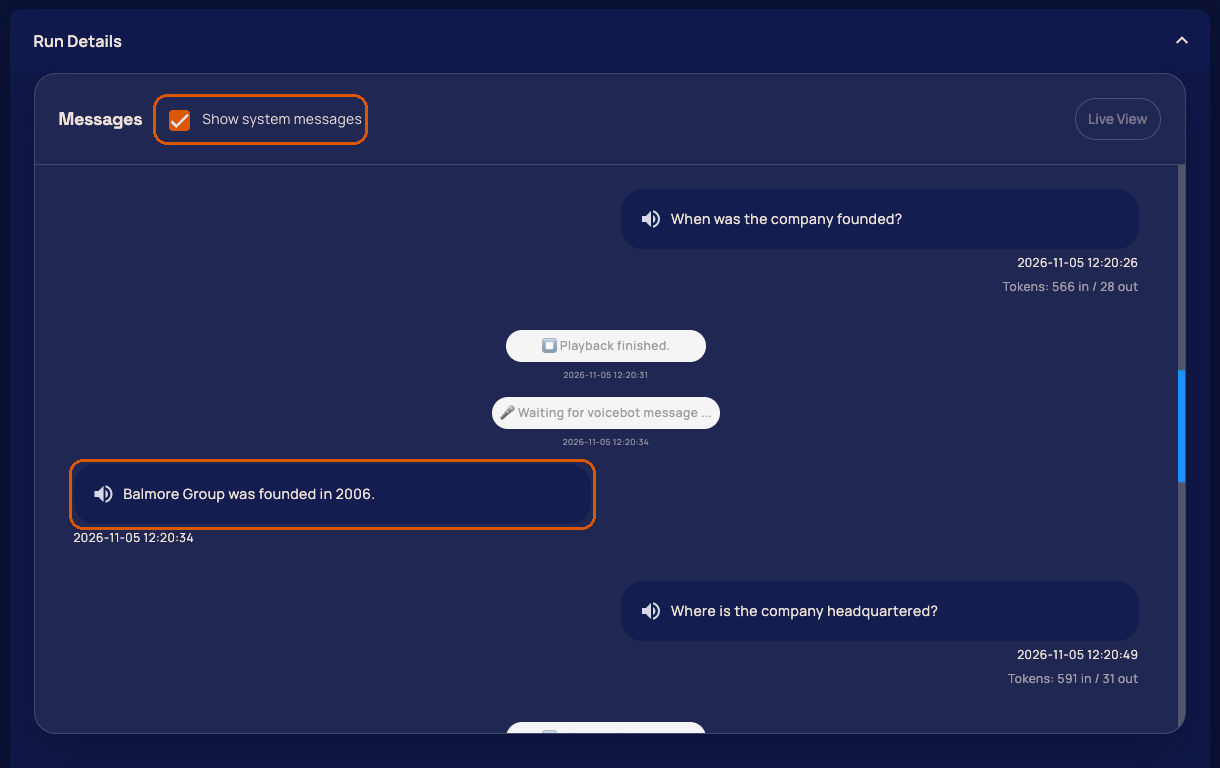
Each run includes the recording of the call and the transcript. This is useful when the evaluation is red and you want to know whether the bot misunderstood the caller or answered incorrectly.
Regression tests in the pipeline
A test that someone starts manually will eventually stop being run. The real benefit comes when the same test cases run automatically before every release. That is what the gentesty API v1 is for. It requires the Enterprise subscription and an API client, which you create in the dashboard.
Authentication uses the OAuth 2.0 Client Credentials flow. A token is valid for 5 minutes, so the helper functions fetch a fresh one for each call:
|
|
Test cases can be grouped with tags. The script starts all test cases of a tag, for example all those that should run before a release:
|
|
After that, it waits until the run group is finished and outputs the failed evaluators per test case:
|
|
The last line ensures that the pipeline step fails if the run group did not pass. Instead of tag_ids, you can also use bot_ids for all test cases of a bot and case_ids for individual test cases. For voicebots, set bot_type to voicebot.
If you do not want to connect a pipeline, you can also schedule test runs. gentesty then reports failures via email, Slack, Microsoft Teams, or Rocket.Chat, starting with the Business plan.
What you should watch out for
There are a few things you should know before relying on tests like these:
- The evaluation itself also comes from a language model. The more specific the expected statement, the more reliable the judgment. Vague statements lead to shaky results. For red runs, read the justification before changing anything in the bot.
- The test only sees what a user sees. That is intentional, but it also means: whether the correct system was called in the background is not something this can verify. For that, you still need tests at the layer below.
- The bot must be reachable from the outside. A chatbot that runs only on the internal network cannot be tested this way.
- Not everything is available in every plan. The API is part of the Enterprise subscription, and custom evaluators with your own prompt are available starting with Business. The details are on the Pricing page.
Conclusion
Bots based on language models can be tested, just not with the methods we are used to from traditional software. If you verify statements instead of wording and let entire conversations happen instead of checking individual answers, you get tests that stay green when the phrasing changes and turn red when there is an actual content error.
My personal assessment: the biggest leverage lies less in the tool than in the test cases. Ten cleanly formulated scenarios for the most important requests, run before every release, are worth more than a hundred vague ones. Start with the conversations that have already gone wrong in production.
If you want to dive deeper, you can find on gentesty.com the pages Automated testing for chatbots and Testing voicebots via phone call, the guide Regression tests for chatbots and voicebots, and the instructions for getting started and the API.
This techup has been translated automatically by ChatGPT
 Stefan Welsch
 – Pionier, Stuntman, Mentor. Als Gründer von b-nova ist Stefan immer auf der Suche nach neuen und vielversprechenden Entwicklungsfeldern. Er ist durch und durch Pragmatiker und schreibt daher auch am liebsten Beiträge die sich möglichst nahe an 'real-world' Szenarien anlehnen.